tutorial · commodore 64
C64 sprites, explained by putting them on the road
Matteo85 is just starting out with Commodore 64 graphics, and he sent me two drawings: a SUV and a frog. But a sprite is understood far sooner by watching one move than by reading its definition, so I did the most direct thing: in a couple of hours, on a Sunday, I put them on the road. Out came Save The Frogs, and the name is his. This is the explanation that grew around it.
Eight drawings the video chip moves on its own
On this machine a sprite isn't an image you draw on the screen: it's something the video chip puts over the background, on its own, while the electron beam crosses the screen. You tell it where it goes, and it puts it there. The background underneath is never touched, so when the object moves you don't have to redraw the road.
That's the real reason sprites exist, and it's worth saying before anything else. On a machine doing a million operations a second, erasing and redrawing a car fifty times a second would eat a good part of the budget on its own. Sprites take that work off the CPU and hand it to a circuit that does it for free.
There are eight sprites. Not nine. It's a fixed number, wired into the chip, and most of the craft on this machine is making eight moving things be enough.
moral: a sprite isn't a drawing, it's a drawing plus a piece of hardware carrying it around. If you remember only this, the rest is detail.
24 by 21, and two ways to fill it
Every sprite is born on a grid of 24 columns by 21 rows. Those look like arbitrary numbers and aren't: 24 points are exactly three bytes per row, and twenty-one rows of three bytes make 63 bytes, which is almost a round block of memory. We'll come back to that "almost".
That grid can be filled in two ways, and the choice is per sprite.
In high resolution each point is one bit: on or off. You get the finest shape the machine can make, but only two outcomes, transparent or the colour assigned to that sprite. One colour. One.
In multicolor the bits are read in pairs, and each pair makes a point that's twice as wide. There are four combinations, and that's where the whole point of the mode lies:
So it isn't "four colours of your choosing": it's one colour of your own plus two borrowed from everybody, plus transparency. If you change shared colour 1 to please the frog, you change it for the SUV too. It's a constraint that decides how you draw, and it can't be dodged: you design around it.
And you pay for it: the points are twice as wide, so across you have twelve, not twenty-four. Shapes come out blocky. Matteo chose multicolor, and it's the right choice for these two subjects: with a single colour, a SUV that needs bodywork, windows and wheels turns into a silhouette.
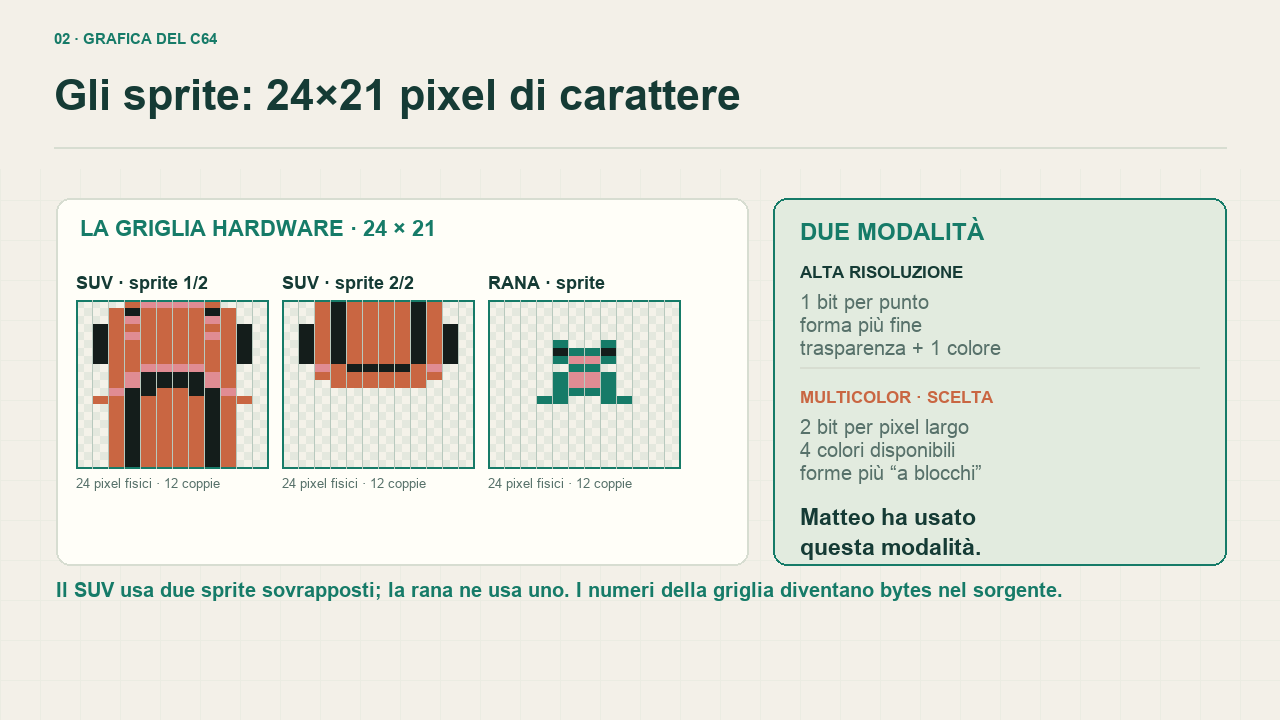
the three sprites on the real grid. You can see the double-width points, and that the SUV takes two grids while the frog takes one.
63 bytes used, 64 taken, and a pointer
The drawing ends up in memory as a flat sequence: three bytes per row, twenty-one rows, top to bottom. Sixty-three bytes. But the chip doesn't fetch the data from an arbitrary address: it reads a pointer, a single number, and multiplies it by 64. That's the "almost" from before: blocks are 64 bytes, the drawing uses 63, and the sixty-fourth byte sits there doing nothing.
The advantage of that pointer is that changing the drawing costs a single write. An animation doesn't move bytes: it changes one number, and on the next frame the sprite is a different drawing. In the game, that's how a run-over frog becomes a run-over frog.
moral: on the C64 animations are cheap and memory is dear. All the frames are already there, and what moves is the finger pointing at them.
Why the SUV is two overlapping sprites
Twenty-four points wide, which in multicolor becomes twelve, is little for a car seen from above that has to read as a car. And above all one colour per sprite is little: the bodywork takes it, and only the two shared colours are left for the windows.
The classic way out is to use two, one on top of the other, at the same position. It costs a second sprite out of eight, but it doubles the colours you own, because each of the two brings its own. The SUV is built that way, the frog isn't: one is enough for it.
And this is where the number eight starts to bite. The SUV has already taken two, so six are left for the frogs on the road. It isn't a theoretical limit: it's the reason the game has that many frogs and not twice as many.
Not drawn: computed
The shadows under the SUV and under the frog weren't drawn by anyone. They come out of a routine that runs before the game, on the computer, and does one thing only: for every filled point in the drawing it looks at the position one down and one to the right, and if there's transparency there it puts a black point.
Four lines, and the result is that the two subjects stop looking glued to the asphalt. It's the kind of trick I like showing to someone starting out, because it turns the starting idea on its head: not everything you see has to be drawn. Some of it gets written, and the program writes it.
There's a further practical reason. A computed shadow stays right if Matteo changes the drawing: he redraws the SUV, reruns the conversion, and the new shadow comes out on its own. A hand-drawn shadow instead comes unstuck from the drawing at the first change, and nobody notices until they look closely.
The drawing doesn't know how to steer
A sprite switched on and standing still is still only a drawing. Its position is two numbers in two registers, and moving it means writing into those registers. Behaviour, the fact that it goes right when you push right, isn't there: you write it.
There's a trap waiting, and it's the first one everybody falls into. The column register is one byte, so it goes up to 255, but the screen is wider. The missing bits all live together in another register, one bit per sprite: if you forget it, your object gets to the middle of the screen and teleports to the left. It isn't a fault in your code, it's the ninth bit you didn't write.
The road is made of characters
Watching the game it looks like the SUV is racing. It isn't: it stays at almost the same height, and it's the road that slides underneath it like a moving carpet. And the road isn't a sprite, because it couldn't be: sprites are eight, and small.
The track is a table of rows. Each entry says where the edges are and which colour band to use, and the program reads an entry, picks the tiles, writes them into screen memory and moves to the next row. Off the carriageway grass, at the sides guardrails and kerbs, in the middle asphalt and a broken centre line. They're characters, that is eight-by-eight pieces redrawn once and reused everywhere.
The curves come out stepped, and that isn't a flaw: it's the visible consequence of that choice. Reusing tiles costs far less than redrawing every point, and on this machine you pay the price in looks, not in time.
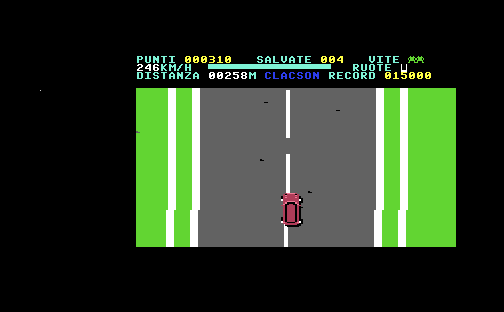
everything visible here except the SUV is made of characters: the grass, the kerbs, the asphalt, the broken centre line and the score panel at the top. There are two sprites, and they're the car.
moral: the practical rule is this. Sprites for the few things that move by themselves; characters for everything else, including what looks like it's moving but is really scrolling. Getting that split wrong is the fastest way to run out of machine.
The chip tells you, but not enough
The video chip can do one handy thing on its own: it notices when two sprites touch, or when a sprite touches the background, and it writes that into two registers. It looks like the answer to everything, and for a game like this one it isn't.
The register tells you which sprites are involved, but not where, and above all it clears itself when you read it: read it twice in the same pass and the second time the collision never happened. On top of that the chip counts as contact any non-transparent point that overlaps, shadow included. A shadow brushing a frog isn't running it over.
So in the game I don't ask the chip about collisions: I compute them. The program knows where things are, compares the frog's row with the car's and then the horizontal distance, and if it's under a certain threshold it counts the hit. It isn't a physics simulation, and that's better: results have to be predictable for the player, not faithful to reality. A threshold in numbers can be widened or tightened until the game feels right; the chip's register can't be tuned.
What sticks, if only one thing does
A sprite is a 24 by 21 drawing that a circuit carries around for you for free, you get eight, and each has a colour of its own plus two borrowed from everybody. Everything else on screen is characters. The drawing doesn't know how to steer, or fall, or die: the program writes that, and the program is the part where a drawing becomes a game.
Save The Frogs was born in a couple of hours and it shows: an endless run, three lives, points that climb with speed, and no finish line. It was never meant to be anything else. It was there to answer a concrete question, do my drawings work?, and that answer comes faster by running them than by explaining them.
Eight minutes, from drawing to game
If you'd rather be told it, everything above is also in a video: the sprites, the road, the game loop, collisions, the menus and the scrolling fault I had to fix.
subtitles can be switched on from the player menu, the speech bubble at the bottom right: they don't start on their own.
Credits. Game design and sprite graphics: Matteo85, who also named the test. The programming is mine.