tutorial · game boy advance
The light that cast a shadow
On the Game Boy Advance there is no lighting engine: there is an adder. Ask it for a light without knowing how it adds, and it hands you back a dirt stain. It really happened, writing VECTOR, and the fault was a double one. Let's see how colour blending works on this machine, line by line, and why getting it wrong raises no error at all.
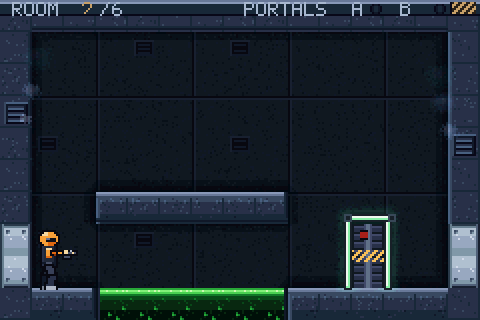
the neon tubes around the doorway and the lamp cones are sprites blended with the background by the hardware: they cost thirty-two tiles in total, and every lamp shares them.
Two layers, two weights, one sum
The machine can blend two layers only at a time, and it calls them first and second target. The first is the one on top, the second the one behind it. In one register you say which layers are targets and what effect you want; in another you say with what weight they enter the sum.
The two weights are called EVA and EVB, they run from 0 to 16 sixteenths, and above 16 they stop. The sum the hardware does, channel by channel, is this:
Read it carefully, because everything is in there: it's a weighted sum, not a multiply and not a "lighten". The two weights don't have to add up to 16: they can add up to more, and the result stops at 31, the maximum of a five-bit channel. That freedom is what lets you light something up, and it's the same freedom that lets you dirty it.
A colour that never arrived
The cones came out darker than the wall. They looked like dirt stains. The first cause wasn't in the art and wasn't in the blending: it was in loading the palette. The loop that copied it carried 96 entries out of 128, and the cones sat in bank 7, that is in the last sixteen. Those sixteen entries were never written, so they stayed at zero: black.
And a black blended with a wall, by the formula above, does exactly what you'd expect: 0 × EVA/16 adds nothing, and the wall enters the sum with a weight below one. The result is the wall, darker. The light had become a shadow, arithmetically.
moral: a wrong colour on screen isn't necessarily an art problem. It can be a colour that never reached memory, and nobody tells you: a half-loaded palette isn't an error to the machine, it's just a palette with zeroes in it.
Why a light has to be nearly white
With the palette fixed, the cones were brown. And they still didn't light anything. The reason is the formula again: if the colour on top is darker than the one below in a channel, that channel goes down. A mid brown has very low blue, so it takes blue away from the wall, and the wall turns into a brown rag instead of a lit area.
With the five-bit-per-channel colours this machine uses, and both weights at a half, the sum comes out like this:
Hence the rule, which holds on any machine that blends by adding: the warmth of a light lives in the hue, not in the value. The cone has to be nearly white, and warm only because red sits just above green and green just above blue. If you put the warmth in by lowering the blue, you're not switching on a lamp: you're laying down a brown gel.
"Sprites among the targets" means ALL the sprites
This is the part that's really specific to this machine, and it cost me an afternoon. To make the cone blend I had switched on the sprite bit among the first targets, in BLDCNT. It sounds reasonable: "sprites take part in blending". Except that on this hardware that bit doesn't mean blend the marked ones. It means blend every sprite.
Result: the character came out olive instead of orange, and the portal vanished, because they were being blended with the wall too. The mechanism for choosing which sprite blends is a different one, and it lives in the sprite's own attribute, not in the global register: it's called semi-transparent mode, and it works on its own, with no need to touch BLDCNT.
moral: two controls that seem to say the same thing are often not two ways of saying it. One is a master switch, the other a switch per room, and whoever reads the documentation in a hurry lights up the whole house.
Read the numbers, don't look at the screen
The symptom said "the character is the wrong colour", and the first instinct is to go and look at the art or the palette. What I did instead was actually read them: the game runs inside an emulator driven by a script, which can read memory while the machine runs. The palette in memory was right, orange. So I read the pixels on screen where the helmet is: a quarter orange over three quarters wall.
That number doesn't say "there's a colour problem": it says exactly which operation was performed, and on what. From there to the blend register is a single step. A pixel's colour, a sprite's slot in the table, the contents of a tile in video memory: on these machines they are all things you can read rather than infer, and more than once the symptom said one thing and the number said another.