macOS app · clipboard
What you copied,
still there.
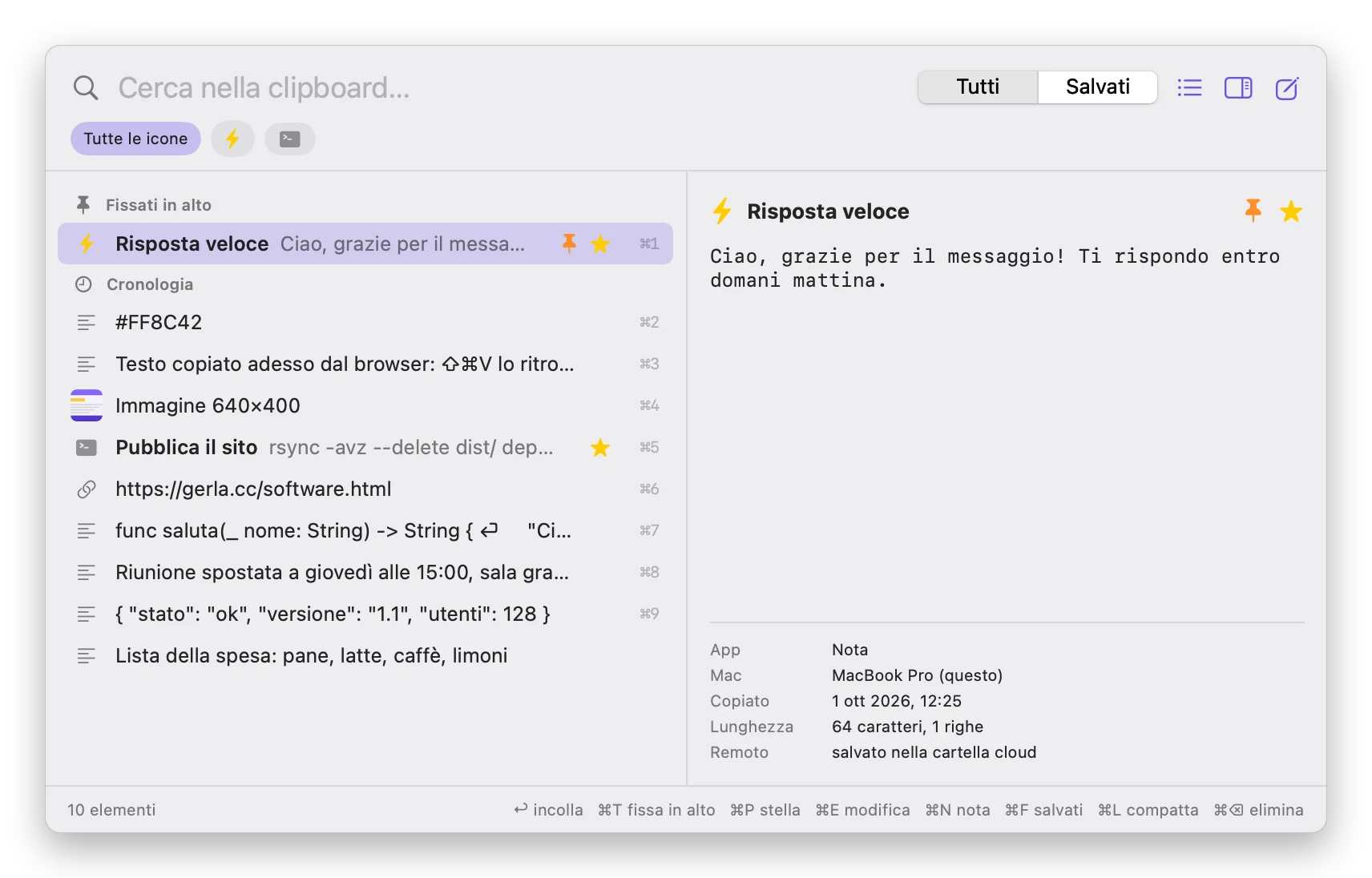
ClipVault keeps the history of everything you copy, text and images, and gives it back with ⇧⌘V: type to search, Return to paste into the app you were in. Favourites are never lost, and if you want they go into a Google Drive, iCloud Drive or Dropbox folder and show up on your other Macs.
it lives in the menu bar: no window in the way until you call it.
What it looks like
Why I wrote it
I'd used Copy 'Em for years and missed just one thing: finding the same copied items on several Macs, without handing my clipboard history to a third-party service. ClipVault uses a folder you already have, your cloud's, and writes one file per item into it.
What it does
⇧⌘V or a click on the icon opens the history: type to search text, title, app and icon; arrows and Return to paste, or ⌘1…⌘9 for the first nine. ⌘P stars, ⌘T pins to the top, ⌘E sets a title, an icon (an emoji too) or edits the text, ⌘N writes a note by hand. Anything with a star, a title or an icon is saved and never dropped by the history limit.
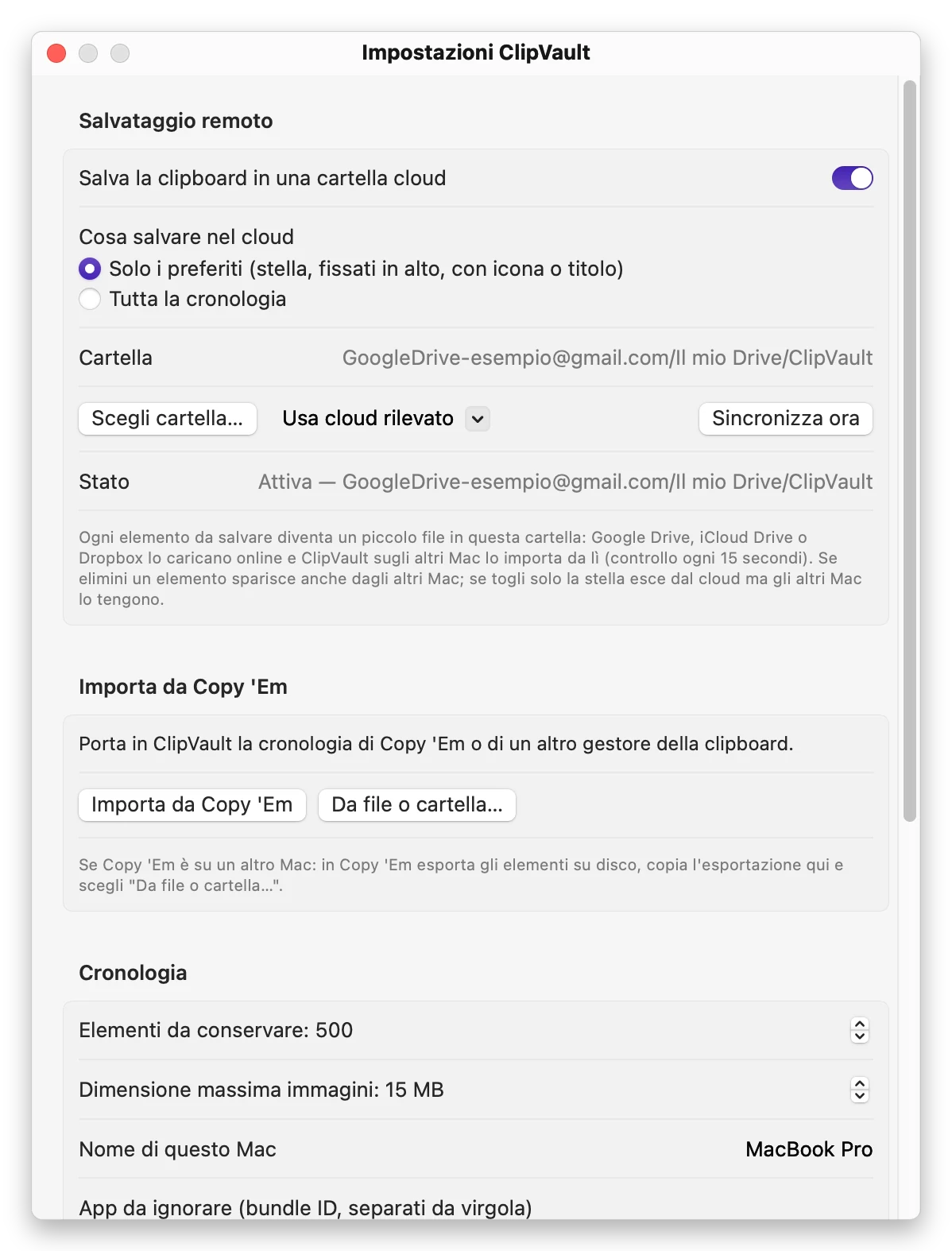
Cloud saving writes into the folder you choose, or one found automatically among Google Drive, iCloud Drive and Dropbox, either favourites only or the whole history. On another Mac with ClipVault and the same folder the histories merge: new items, stars and deletions travel from one Mac to the other.
From Copy 'Em it imports lists (with their icon and name as title) and, if you want, the history too. It also reads exports, databases, zips and folders of text and images.
The three things I'm proudest of
It doesn't see passwords
What you copy from 1Password, Bitwarden or the Keychain is ignored, and you can exclude other apps. Files copied from the Finder aren't saved.
No server of mine
Syncing goes through a folder in your own cloud, one file per item. The data never reaches me.
All without a mouse
Open, search, pick, paste: every action has its key, and the window closes with Esc leaving you where you were.
Specs and requirements
- version 1.0
- requires macOS 13 Ventura or later
- processor Apple Silicon and Intel (universal)
- saves text and images
- cloud any synced folder: Google Drive, iCloud Drive, Dropbox, OneDrive
- imports from Copy 'Em, exports, SQLite databases, plist, JSON, zip
- language Italian
- price €9.99, once
A few limits, said up front
- Between Macs the history lines up roughly every 15 seconds, and it also depends on how fast your cloud syncs the folder.
- Pasting straight into the active app needs the Accessibility permission. Without it, the item is copied and you just press ⌘V.
- Files copied from the Finder aren't saved, by design.
- The interface is Italian only for now.
How to install
Download the .dmg
Click "Download": you pay through PayPal and the ClipVault-1.0.dmg download starts on its own.
Drag it into Applications
Open the .dmg file: the window contains ClipVault, a shortcut to Applications and a picture with the next step's instructions. Drag the ClipVault icon onto Applications.
If macOS says it "can't be verified"
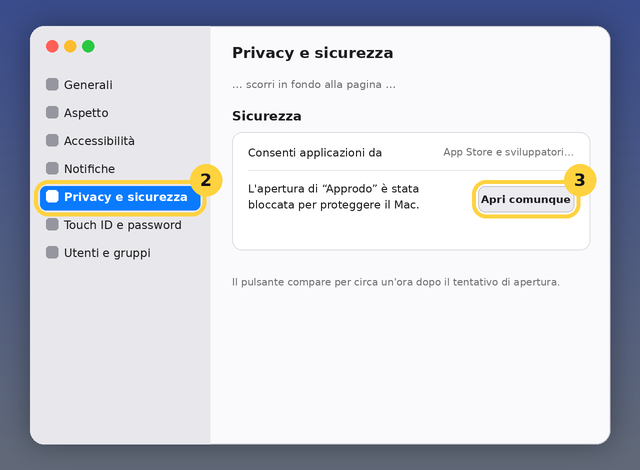
On the first double-click macOS warns it can't verify the app: click Done, then go to System Settings › Privacy & Security and at the bottom click Open Anyway. You only do it once. The step-by-step guide with screenshots is here.
The permissions it asks for
To paste straight into the app you were in, ClipVault asks for Accessibility: System Settings › Privacy & Security › Accessibility, turn on ClipVault. After an app update macOS may ask again.
Licence
€9.99 once, no subscription and no registration. The licence covers personal and professional use on your own Macs. It is not open source. I only ask that you don't redistribute the file elsewhere: link this page, so whoever installs it always gets the current version.
If something doesn't work, write to me.